Laptop Hinge Repair in Trichy | Broken Hinge Replacement
Broken laptop hinges? We fix and replace hinges for all laptop brands.
Laptop hinges connect the screen to the base and allow opening/closing. When they break, your laptop screen becomes loose, difficult to open, or may even damage the display cable and screen.
Signs Your Laptop Hinges Need Repair
❌ Screen Wobbles or Loose Screen moves back and forth, doesn’t stay in position.
❌ Hard to Open/Close Laptop Requires excessive force, makes cracking sounds when opening.
❌ Visible Hinge Damage You can see broken plastic or metal around the hinge area.
❌ Screen Doesn’t Stay Open Screen falls back or forward, won’t hold at desired angle.
❌ Cracking Sounds Loud cracking, creaking, or popping when opening/closing lid.
❌ Screen Bezel Separating Plastic frame around the screen is coming apart near hinges.
❌ Hinge Cover Missing/Broken Plastic hinge covers broken or fallen off.
❌ Display Cable Visible You can see wires/cables because hinge broke the casing.
Why Hinge Problems Happen
Common Causes:
Opening laptop from one corner (stress on one hinge)
Opening lid with excessive force
Age and wear (plastic becomes brittle)
Poor build quality (some models have weak hinges)
Previous drop or impact
Opening laptop while holding screen edges
What We Replace/Repair
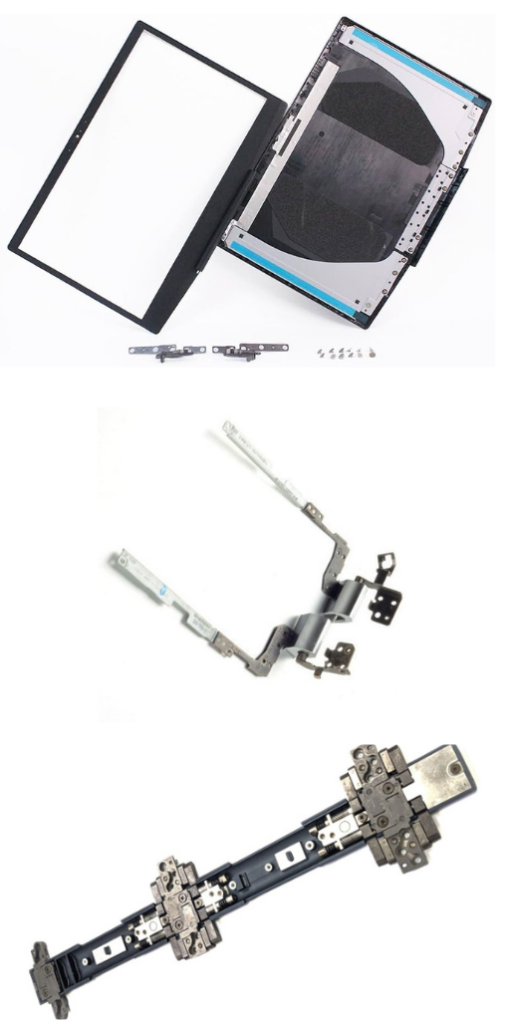
Hinge Assembly
Left and right hinge mechanisms
Metal hinge brackets
Hinge mounting screws
Cost: ₹1,500-3,000
Screen Bezel/Frame
Plastic frame around screen (if cracked)
Cost: ₹800-2,000
Bottom Case Reinforcement
Repair hinge mounting points on base
Reinforce cracked plastic
Cost: ₹500-1,500
Hinge Covers
Plastic covers that hide hinges
Cost: ₹300-800
Complete Hinge Assembly
Both hinges + brackets + covers
Cost: ₹2,000-4,000
Service Costs by Laptop Type
Budget Laptops (₹1,500-2,000):
HP 14s, 15s
Lenovo IdeaPad 3
Dell Inspiron 3000
ASUS VivoBook basic
Mid-Range Laptops (₹2,000-3,000):
HP Pavilion
Dell Inspiron 5000/7000
Lenovo IdeaPad 5
ASUS VivoBook S15
Premium Laptops (₹3,000-5,000):
Gaming laptops (heavier screens = more complex)
Business laptops (ThinkPad, Dell Latitude)
MacBooks
Ultra-premium models
Additional Costs:
Screen bezel: +₹800-2,000
Bottom case repair: +₹500-1,500
Display cable if damaged: +₹800-1,500
Service Process
Step 1: Inspection We examine both hinges, screen bezel, and mounting points to assess damage.
Step 2: Test Opening/Closing Check how severe the issue is.